
Under the topology section you can define the interfaces that will be configured on the switches in your fabric. You will create a new file named interfaces_access.nac.yml.
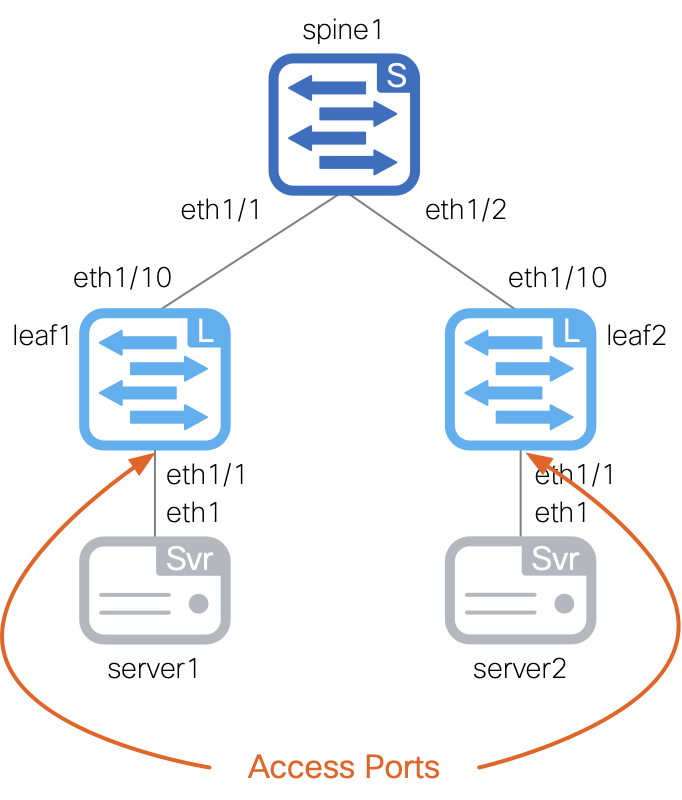
This file will contain the access interfaces to use per switch. It defines which VLAN to use as well as other parameters such as MTU, speed, and description.
Copy and paste the following content into the file.
touch ~/workspace/ndlab/nac/host_vars/site1-fabric/interfaces_access.nac.yml
code-server -r ~/workspace/ndlab/nac/host_vars/site1-fabric/interfaces_access.nac.yml
Copy and paste the following content into the interfaces_access.nac.yml file that is now open in your VSCode editor.
---

vxlan:
  topology:
    switches:
      - name: site1-l1
        interfaces:
          - name: Ethernet1/4
            description: To Server1 E1
            mode: access
            enabled: true
            mtu: jumbo
            speed: auto
            access_vlan: 2401
            spanning_tree_portfast: true
      - name: site1-l2
        interfaces:
          - name: Ethernet1/4
            description: To Server3 E1
            mode: access
            enabled: true
            mtu: jumbo
            speed: auto
            access_vlan: 2401
            spanning_tree_portfast: true
In addition to the access interfaces, you will also create a new file named interfaces_vpc.nac.yml.
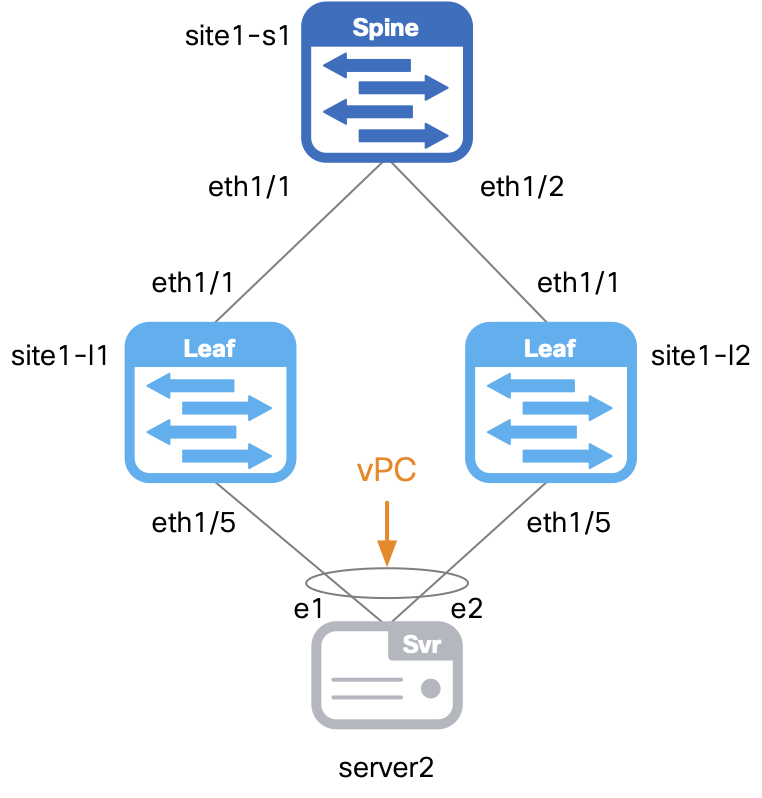
This file will contain the vPC interfaces to use per switch. It defines parameters such as vPC ID, port-channel mode, and port-channel member interfaces.
As you can see, you can easily split your interface definitions across multiple files to keep things organized.
touch ~/workspace/ndlab/nac/host_vars/site1-fabric/interfaces_vpc.nac.yml
code-server -r ~/workspace/ndlab/nac/host_vars/site1-fabric/interfaces_vpc.nac.yml
Copy and paste the following content into the interfaces_vpc.nac.yml file that is now open in your VSCode editor.
---

vxlan:
  topology:
    switches:
      - name: site1-l1
        interfaces:
          - name: port-channel5
            description: To Server2 bond
            mode: trunk
            enabled: true
            pc_mode: active
            vpc_id: 5
            members:
              - eth1/5
            mtu: jumbo
            speed: auto
            spanning_tree_portfast: true
      - name: site1-l2
        interfaces:
          - name: port-channel5
            description: To Server2 bond
            mode: trunk
            enabled: true
            pc_mode: active
            vpc_id: 5
            members:
              - eth1/5
            mtu: jumbo
            speed: auto
            spanning_tree_portfast: true
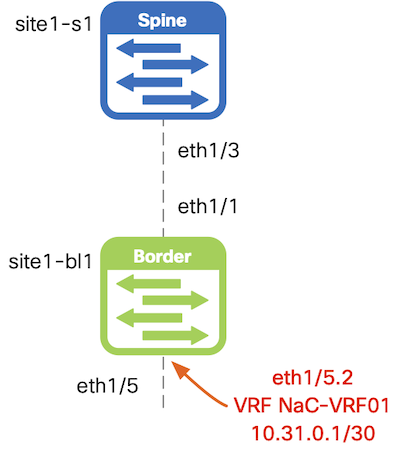
This file will contain the routed interfaces to use, in this case on the pre-provisioned border leaf switch. It defines parameters such as sub-interface dot1q ID, VRF, and IP address.
touch ~/workspace/ndlab/nac/host_vars/site1-fabric/interfaces_routed.nac.yml
code-server -r ~/workspace/ndlab/nac/host_vars/site1-fabric/interfaces_routed.nac.yml
Copy and paste the following content into the interfaces_routed.nac.yml file that is now open in your VSCode editor.
---

vxlan:
  topology:
    switches:
      - name: site1-bl1
        interfaces:
          - name: Ethernet1/5
            mode: routed
            description: To ExtRtr Eth1/1
            enabled: true
          - name: Ethernet1/5.2
            mode: routed_sub
            description: To ExtRtr Eth1/1.2
            enabled: true
            dot1q_id: 2
            vrf: NaC-VRF01
            ipv4_address: 10.31.0.1/30
Make sure you are in your root Ansible directory.
cd ~/workspace/ndlab/nac
From the root Ansible project directory execute the following command:
ansible-playbook -i hosts.site1.yml vxlan.yml --tags cr_manage_interfaces
Upon a successful run of the playbook your output should look as follows:
  <... SNIP ...>

  PLAY RECAP ************************************************************************************************************************************************************
  site1-fabric               : ok=230  changed=33   unreachable=0    failed=0    skipped=747  rescued=0    ignored=0


  PLAYBOOK RECAP ********************************************************************************************************************************************************
  Playbook run took 0 days, 0 hours, 1 minutes, 39 seconds


  TASKS RECAP ***********************************************************************************************************************************************************
  Tuesday 27 January 2026  03:32:08 +0000 (0:00:00.575)       0:01:39.812 *******
  ===============================================================================
  cisco.nac_dc_vxlan.create : Manage Interface All in Nexus Dashboard -------------------------------------------------------------------------------------------- 6.29s
  cisco.nac_dc_vxlan.common : Get POAP Data From POAP Enabled Devices -------------------------------------------------------------------------------------------- 2.19s
  cisco.nac_dc_vxlan.common : Display Flag Values ---------------------------------------------------------------------------------------------------------------- 2.16s
  cisco.nac_dc_vxlan.connectivity_check : Get Cisco Nexus Dashboard Fabric Controller Version -------------------------------------------------------------------- 1.82s
  cisco.nac_dc_vxlan.common : Get Multisite Fabric Associations in Nexus Dashboard ------------------------------------------------------------------------------- 1.34s
  cisco.nac_dc_vxlan.common : Build Fabric Creation Parameters From Template ------------------------------------------------------------------------------------- 0.96s
  cisco.nac_dc_vxlan.validate : Copy Service Model Data to Host -------------------------------------------------------------------------------------------------- 0.93s
  cisco.nac_dc_vxlan.common : Retrieve NDFC Device Username and Password from Group Vars and update inv_config --------------------------------------------------- 0.89s
  cisco.nac_dc_vxlan.common : Retrieve NDFC Device Username and Password from Group Vars and update inv_config --------------------------------------------------- 0.88s
  cisco.nac_dc_vxlan.connectivity_check : Verify Authorization to Nexus Dashboard -------------------------------------------------------------------------------- 0.83s
  cisco.nac_dc_vxlan.common : Build Fabric Switch Inventory List From Template ----------------------------------------------------------------------------------- 0.78s
  cisco.nac_dc_vxlan.common : Build Interface Po ----------------------------------------------------------------------------------------------------------------- 0.76s
  cisco.nac_dc_vxlan.common : Build Loopback Interfaces List From Template --------------------------------------------------------------------------------------- 0.75s
  cisco.nac_dc_vxlan.common : Build Interface -------------------------------------------------------------------------------------------------------------------- 0.75s
  cisco.nac_dc_vxlan.common : Build vPC interface ---------------------------------------------------------------------------------------------------------------- 0.74s
  cisco.nac_dc_vxlan.common : Build Networks Attach List From Template ------------------------------------------------------------------------------------------- 0.73s
  cisco.nac_dc_vxlan.common : Build Interface -------------------------------------------------------------------------------------------------------------------- 0.73s
  cisco.nac_dc_vxlan.common : Build sub_interface ---------------------------------------------------------------------------------------------------------------- 0.73s
  cisco.nac_dc_vxlan.common : Build Fabric Links ----------------------------------------------------------------------------------------------------------------- 0.73s
  cisco.nac_dc_vxlan.common : Build Policy List From Template ---------------------------------------------------------------------------------------------------- 0.72s

  ROLES RECAP ***********************************************************************************************************************************************************
  Tuesday 27 January 2026  03:32:08 +0000 (0:00:00.580)       0:01:39.816 *******
  ===============================================================================
  common ----------------------------------------------------------------- 72.09s
  create ----------------------------------------------------------------- 11.11s
  validate ---------------------------------------------------------------- 6.64s
  connectivity_check ------------------------------------------------------ 4.08s
  common_global ----------------------------------------------------------- 0.05s
  ~~~~~~~~~~~~~~~~~~~~~~~~~~~~~~~~~~~~~~~~~~~~~~~~~~~~~~~~~~~~~~~~~~~~~~~~~~~~~~~
  total ------------------------------------------------------------------ 93.97s
Return to your ND browser where you should be sitting on the Switches tab.
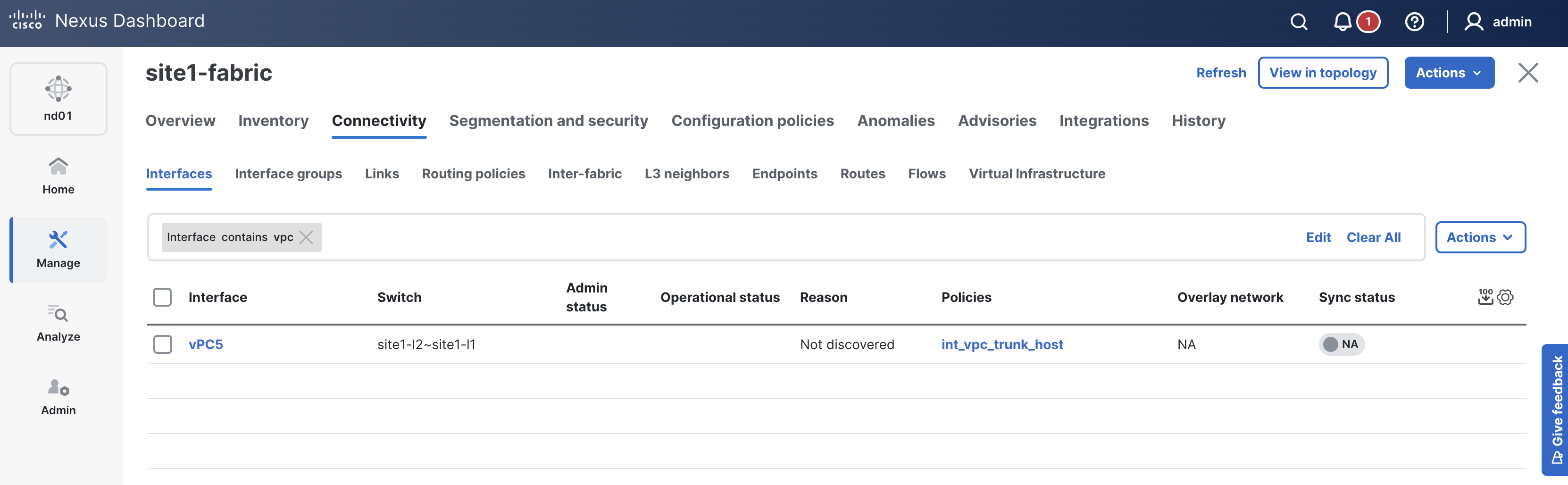
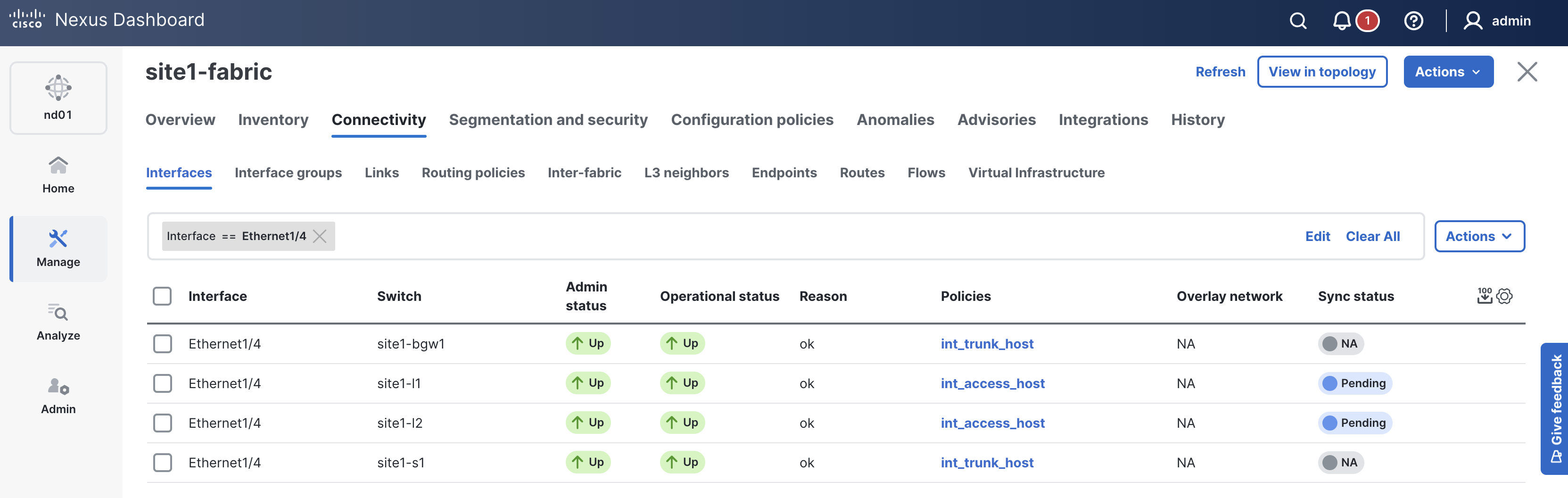
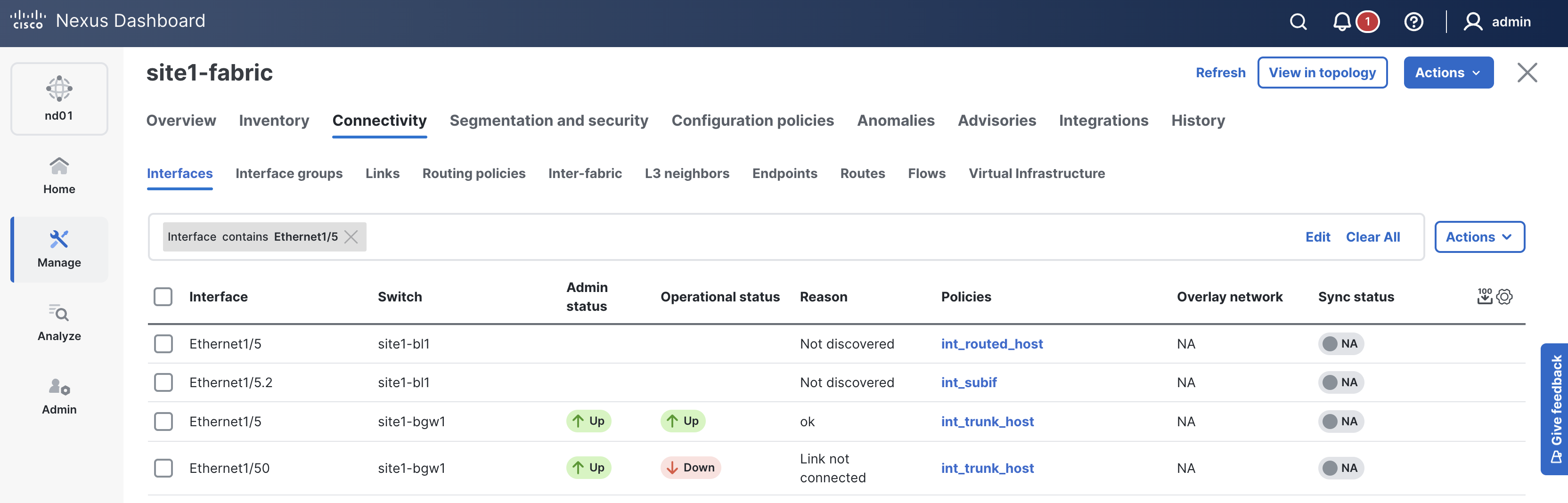
When reviewing the Interfaces tab, it is expected to see interfaces in various states since a deployment has not taken place yet. Again, you will deploy to your switches in the deploy role. Follow the remaining steps to verify the interface configuration is pre-staged in ND.
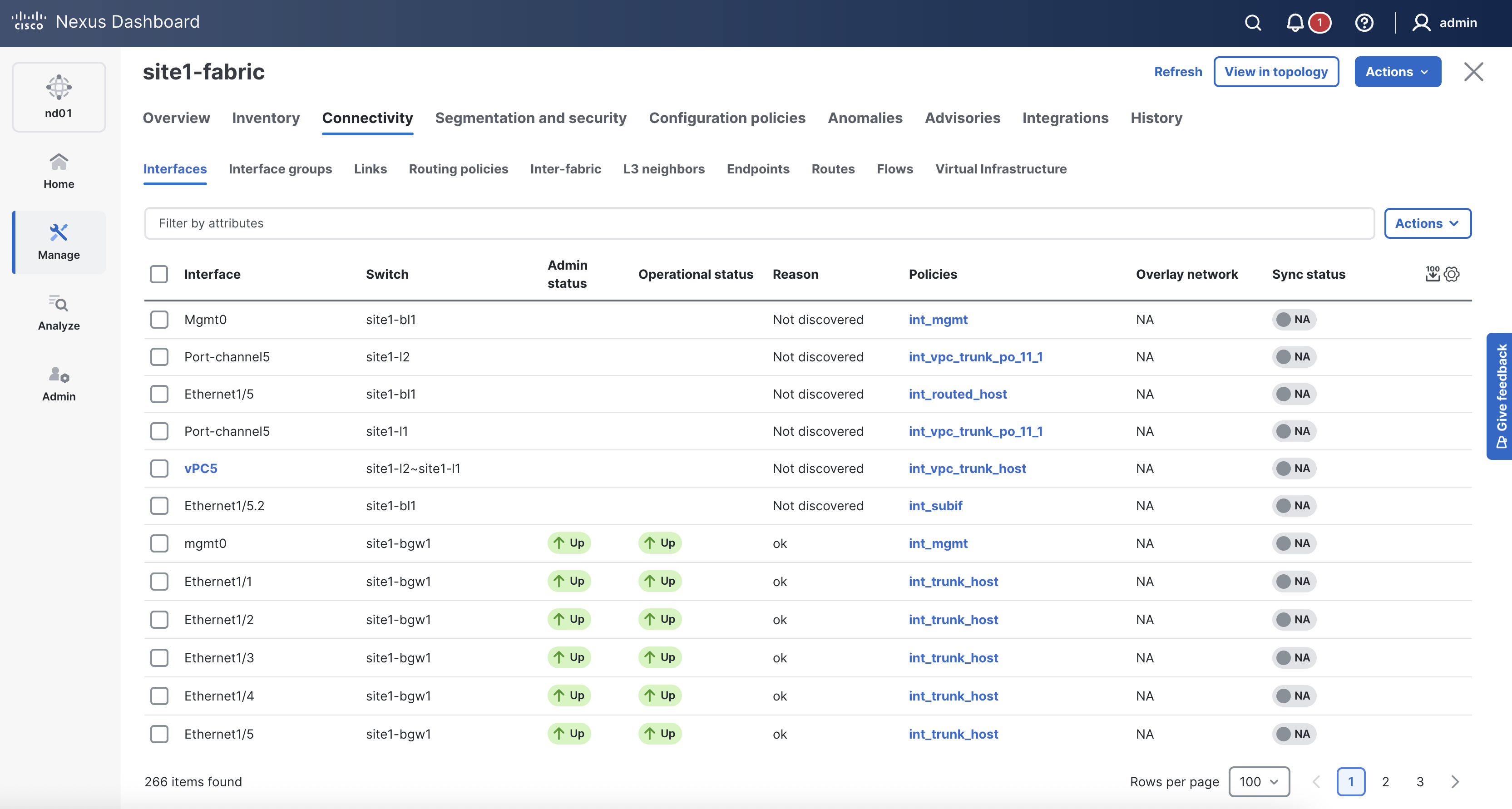

EnterMake sure interface vPC5 is created between site1-l1 and site1-l2. This will change to In-Sync after the deployment role is completed later in the lab.

EnterVerify that the policy for interface Ethernet1/4 on site1-l1 and site1-l2 is set to access

EnterVerify that the policy for interface Ethernet1/5 on site1-bl1 is routed
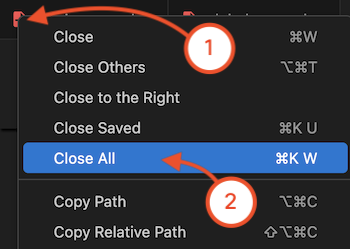
Navigate back to your VSCode application.
Continue to the next section to build out the overlay by defining VRFs and networks.