
The VXLAN as Code collection already validates your data model using built-in syntax and semantic rules. In this section, you will add a custom rule that enforces configuration compliance before any NetDevOps pipeline work begins. The rule file is for the local lab demonstration only; later, Git will ignore the rule directory and the pipeline will leave the rules path environment variable unset.
The compliance policy is that every overlay Network vlan_name must be built from the Network name and VLAN ID:
<network name>_vlan<vlan_id>
For example, NaC-Net01 with VLAN ID 2401 must use the VLAN name NaC-Net01_vlan2401.
Return to your Visual Studio Code terminal and create a directory named enhanced_rules in the root of your NaC project.
This directory will contain custom semantic validation rules that run after the collection's built-in rules.
cd ~/workspace/ndlab/nac
mkdir -p enhanced_rules
touch enhanced_rules/900_network_vlan_name_convention.py
code-server -r enhanced_rules/900_network_vlan_name_convention.py
Copy and paste the following Python rule into the file that is now open in VSCode. The rule checks both single-fabric overlay data and Multi-Site overlay data.
class Rule:
    id = "900"
    description = "Validate Network vlan_name follows the configuration compliance policy"
    severity = "HIGH"

    @classmethod
    def match(cls, data_model):
        results = []
        network_paths = [
            ("vxlan.overlay.networks", ["vxlan", "overlay", "networks"]),
            ("vxlan.multisite.overlay.networks", ["vxlan", "multisite", "overlay", "networks"]),
        ]

        for label, path in network_paths:
            networks = cls.safeget(data_model, path) or []
            for network in networks:
                name = network.get("name")
                vlan_id = network.get("vlan_id")
                vlan_name = network.get("vlan_name")

                if not name or vlan_id is None or not vlan_name:
                    continue

                expected_vlan_name = f"{name}_vlan{vlan_id}"
                if vlan_name != expected_vlan_name:
                    results.append(
                        f"{label}: network ({name}) vlan_name ({vlan_name}) "
                        f"must be ({expected_vlan_name}) to match the configuration compliance policy."
                    )

        return results

    @classmethod
    def safeget(cls, data, keys):
        for key in keys:
            if not isinstance(data, dict) or key not in data:
                return None
            data = data[key]
        return data
The validate role looks for enhanced rules when the enhanced_rules_path variable is defined.
Add this variable to group_vars/nd/nd.yml using an environment variable lookup.
The enhanced_rules directory itself will be ignored by Git later in the lab.
cat << 'EOF' >> group_vars/nd/nd.yml

# Custom enhanced semantic validation rules for this lab.
enhanced_rules_path: "{{ lookup('ansible.builtin.env', 'DC_VXLAN_RULES') }}"
EOF

export DC_VXLAN_RULES="${PWD}/enhanced_rules"
Run the playbook with the role_validate tag.
The collection runs the built-in validation rules and the custom rule you just enabled.
ansible-playbook -i hosts.msd.yml vxlan.yml --tags role_validate
Since the data model currently follows the configuration compliance policy, the run should complete successfully.
  <... SNIP ...>

  PLAY RECAP **************************************************************************************************************************************************
  msd-fabric-group           : ok=28   changed=2    unreachable=0    failed=0    skipped=13   rescued=0    ignored=0


  PLAYBOOK RECAP **********************************************************************************************************************************************
  Playbook run took 0 days, 0 hours, 0 minutes, 6 seconds


  TASKS RECAP *************************************************************************************************************************************************
  Wednesday 03 June 2026  07:43:15 +0000 (0:00:00.099)       0:00:06.390 ********
  ===============================================================================
  cisco.nac_dc_vxlan.validate : Copy Service Model Data to Host ---------------------------------------------------------------------------------------- 0.73s
  cisco.nac_dc_vxlan.validate : Copy Extended Service Model Data to Host ------------------------------------------------------------------------------- 0.63s
  cisco.nac_dc_vxlan.validate : Move Golden Service Model Data Previous -------------------------------------------------------------------------------- 0.51s
  cisco.nac_dc_vxlan.validate : Stat Factory Defaults -------------------------------------------------------------------------------------------------- 0.49s
  cisco.nac_dc_vxlan.validate : Stat the Extended Service Model Data ----------------------------------------------------------------------------------- 0.37s
  cisco.nac_dc_vxlan.validate : Stat the Golden Service Model Data ------------------------------------------------------------------------------------- 0.35s
  cisco.nac_dc_vxlan.validate : Move Extended Service Model Data Previous ------------------------------------------------------------------------------ 0.34s
  cisco.nac_dc_vxlan.validate : Role Entry Point - [cisco.nac_dc_vxlan.validate] ----------------------------------------------------------------------- 0.21s
  cisco.nac_dc_vxlan.validate : Validate NDFC Service Model Data --------------------------------------------------------------------------------------- 0.19s
  cisco.nac_dc_vxlan.validate : Display Role Path ------------------------------------------------------------------------------------------------------ 0.19s
  cisco.nac_dc_vxlan.validate : Display Workflow Type - Direct to Controller (DTC) --------------------------------------------------------------------- 0.19s
  cisco.nac_dc_vxlan.validate : Display Inventory Directory -------------------------------------------------------------------------------------------- 0.18s
  cisco.nac_dc_vxlan.validate : Prepare Service Model -------------------------------------------------------------------------------------------------- 0.18s
  cisco.nac_dc_vxlan.validate : Check for Enhanced Roles Path Being Defined ---------------------------------------------------------------------------- 0.11s
  cisco.nac_dc_vxlan.validate : Delete the found files ------------------------------------------------------------------------------------------------- 0.10s
  cisco.nac_dc_vxlan.validate : Perform Custom Enhanced Syntax and Semantic Model Validation ----------------------------------------------------------- 0.08s
  cisco.nac_dc_vxlan.validate : Perform Required Syntax and Semantic Model Validation ------------------------------------------------------------------ 0.08s
  cisco.nac_dc_vxlan.validate : Merge factory and custom defaults -------------------------------------------------------------------------------------- 0.07s
  cisco.nac_dc_vxlan.validate : Register Variable With Only Defaults from Previous Task ---------------------------------------------------------------- 0.07s
  cisco.nac_dc_vxlan.validate : Include Factory Defaults if Available ---------------------------------------------------------------------------------- 0.06s

  ROLES RECAP *************************************************************************************************************************************************
  Wednesday 03 June 2026  07:43:15 +0000 (0:00:00.100)       0:00:06.390 ********
  ===============================================================================
  validate ---------------------------------------------------------------- 6.04s
  common_global ----------------------------------------------------------- 0.05s
  ~~~~~~~~~~~~~~~~~~~~~~~~~~~~~~~~~~~~~~~~~~~~~~~~~~~~~~~~~~~~~~~~~~~~~~~~~~~~~~~
  total ------------------------------------------------------------------- 6.09s
Next, intentionally change one vlan_name value so the data model violates the custom rule.
This simulates a common copy and paste error that can sneak into larger overlay changes.
sed -i 's/NaC-Net01_vlan2401/NaC-Net01_vlan9999/' host_vars/msd-fabric-group/networks.nac.yml
Run the playbook again with the same tag. This time the custom validation rule should stop the run before any data is pushed to ND.
ansible-playbook -i hosts.msd.yml vxlan.yml --tags role_validate
The failed task should identify the Network, the incorrect value, and the expected value.
  <... SNIP ...>


      "msg": "Semantic error, rule 900: Validate Network vlan_name follows the configuration compliance policy (['vxlan.multisite.overlay.networks: network (NaC-Net01) vlan_name (NaC-Net01_vlan9999) must be (NaC-Net01_vlan2401) to match the configuration compliance policy.'])\n"
  }

  PLAY RECAP **************************************************************************************************************************************************
  msd-fabric-group           : ok=8    changed=0    unreachable=0    failed=1    skipped=2    rescued=0    ignored=0

  <... SNIP ...>
Restore the expected vlan_name value so the data model conforms to the custom rule.
sed -i 's/NaC-Net01_vlan9999/NaC-Net01_vlan2401/' host_vars/msd-fabric-group/networks.nac.yml
Run the playbook one more time to confirm the corrected data model passes both the built-in rules and your enhanced custom rule.
ansible-playbook -i hosts.msd.yml vxlan.yml --tags role_validate
  <... SNIP ...>

  PLAY RECAP **************************************************************************************************************************************************
  msd-fabric-group           : ok=28   changed=2    unreachable=0    failed=0    skipped=13   rescued=0    ignored=0


  PLAYBOOK RECAP **********************************************************************************************************************************************
  Playbook run took 0 days, 0 hours, 0 minutes, 6 seconds


  TASKS RECAP *************************************************************************************************************************************************
  Wednesday 03 June 2026  07:50:05 +0000 (0:00:00.098)       0:00:06.634 ********
  ===============================================================================
  cisco.nac_dc_vxlan.validate : Copy Service Model Data to Host ---------------------------------------------------------------------------------------- 0.76s
  cisco.nac_dc_vxlan.validate : Copy Extended Service Model Data to Host ------------------------------------------------------------------------------- 0.65s
  cisco.nac_dc_vxlan.validate : Stat Factory Defaults -------------------------------------------------------------------------------------------------- 0.56s
  cisco.nac_dc_vxlan.validate : Move Golden Service Model Data Previous -------------------------------------------------------------------------------- 0.52s
  cisco.nac_dc_vxlan.validate : Stat the Extended Service Model Data ----------------------------------------------------------------------------------- 0.38s
  cisco.nac_dc_vxlan.validate : Stat the Golden Service Model Data ------------------------------------------------------------------------------------- 0.37s
  cisco.nac_dc_vxlan.validate : Move Extended Service Model Data Previous ------------------------------------------------------------------------------ 0.37s
  cisco.nac_dc_vxlan.validate : Role Entry Point - [cisco.nac_dc_vxlan.validate] ----------------------------------------------------------------------- 0.20s
  cisco.nac_dc_vxlan.validate : Display Inventory Directory -------------------------------------------------------------------------------------------- 0.20s
  cisco.nac_dc_vxlan.validate : Prepare Service Model -------------------------------------------------------------------------------------------------- 0.20s
  cisco.nac_dc_vxlan.validate : Display Workflow Type - Direct to Controller (DTC) --------------------------------------------------------------------- 0.18s
  cisco.nac_dc_vxlan.validate : Display Role Path ------------------------------------------------------------------------------------------------------ 0.18s
  cisco.nac_dc_vxlan.validate : Validate NDFC Service Model Data --------------------------------------------------------------------------------------- 0.18s
  cisco.nac_dc_vxlan.validate : Check for Enhanced Roles Path Being Defined ---------------------------------------------------------------------------- 0.10s
  cisco.nac_dc_vxlan.validate : Delete the found files ------------------------------------------------------------------------------------------------- 0.10s
  cisco.nac_dc_vxlan.validate : Perform Custom Enhanced Syntax and Semantic Model Validation ----------------------------------------------------------- 0.09s
  cisco.nac_dc_vxlan.validate : Perform Required Syntax and Semantic Model Validation ------------------------------------------------------------------ 0.09s
  cisco.nac_dc_vxlan.validate : Merge factory and custom defaults -------------------------------------------------------------------------------------- 0.07s
  cisco.nac_dc_vxlan.validate : Include Factory Defaults if Available ---------------------------------------------------------------------------------- 0.07s
  cisco.nac_dc_vxlan.validate : Register Variable With Only Defaults from Previous Task ---------------------------------------------------------------- 0.06s

  ROLES RECAP *************************************************************************************************************************************************
  Wednesday 03 June 2026  07:50:05 +0000 (0:00:00.099)       0:00:06.634 ********
  ===============================================================================
  validate ---------------------------------------------------------------- 6.29s
  common_global ----------------------------------------------------------- 0.05s
  ~~~~~~~~~~~~~~~~~~~~~~~~~~~~~~~~~~~~~~~~~~~~~~~~~~~~~~~~~~~~~~~~~~~~~~~~~~~~~~~
  total ------------------------------------------------------------------- 6.34s
Navigate back to your VSCode application.
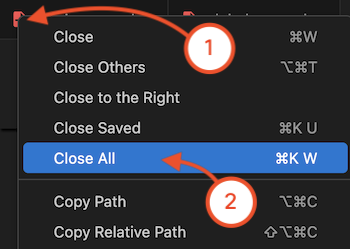
Continue to the next section to bring your local NaC project into GitLab and begin the NetDevOps pipeline workflow.