
In this section you will be deploying the Terraform configuration to the fabric.
modules/fabric/deploy.tf file
touch ~/workspace/ndlab/terraform/modules/fabric/deploy.tf
code-server -r ~/workspace/ndlab/terraform/modules/fabric/deploy.tf
Finally, you will leverage the ndfc_configuration_deploy resource to deploy the configuration to the fabric. This resource allows you to trigger the deployment of the configuration to the devices in the fabric. The serial_numbers argument is set to ["ALL"], which means that the configuration will be deployed to all devices in the fabric.
This resource depends on the previously defined resources, ensuring that the fabric, interfaces, VRFs, and networks are created before the deployment is triggered.
resource "ndfc_configuration_deploy" "nac_configuration_deploy_1" {
  fabric_name    = var.fabric_name
  serial_numbers = ["ALL"]
  recalculate    = true
  always_execute = false
  deploy         = true

  depends_on = [
    ndfc_fabric_vxlan_evpn.nac_fabric1,
    ndfc_inventory_devices.nac_inventory_devices_1,
    ndfc_interface_ethernet.nac_interface_ethernet_1,
    ndfc_interface_loopback.nac_interface_loopback_1,
    ndfc_interface_portchannel.nac_interface_portchannel_1,
    ndfc_vrfs.nac_vrfs_1,
    ndfc_networks.nac_networks_1,
  ]
}
terraform apply command to create and configure the fabric using Terraform
terraform apply
NOTE: When prompted to confirm the action, type yes and press Enter.
Plan: 9 to add, 0 to change, 0 to destroy.

Do you want to perform these actions?
  Terraform will perform the actions described above.
  Only 'yes' will be accepted to approve.

  Enter a value: yes
Once you enter "yes" to approve the plan, Terraform will start creating the resources as defined in your configuration. The output will show the progress of each resource being created, including any dependencies that need to be satisfied before a resource can be created like so:
module.fabric.ndfc_fabric_vxlan_evpn.nac_fabric1: Creating...
module.fabric.ndfc_fabric_vxlan_evpn.nac_fabric1: Creation complete after 7s [id=fabric-terraform]
module.fabric.ndfc_inventory_devices.nac_inventory_devices_1: Creating...
module.fabric.ndfc_inventory_devices.nac_inventory_devices_1: Still creating... [00m10s elapsed]
module.fabric.ndfc_inventory_devices.nac_inventory_devices_1: Still creating... [00m20s elapsed]
module.fabric.ndfc_inventory_devices.nac_inventory_devices_1: Still creating... [00m30s elapsed]
module.fabric.ndfc_inventory_devices.nac_inventory_devices_1: Still creating... [00m40s elapsed]
module.fabric.ndfc_inventory_devices.nac_inventory_devices_1: Still creating... [00m50s elapsed]
module.fabric.ndfc_inventory_devices.nac_inventory_devices_1: Still creating... [01m00s elapsed]
module.fabric.ndfc_inventory_devices.nac_inventory_devices_1: Still creating... [01m10s elapsed]
module.fabric.ndfc_inventory_devices.nac_inventory_devices_1: Still creating... [01m20s elapsed]
module.fabric.ndfc_inventory_devices.nac_inventory_devices_1: Still creating... [01m30s elapsed]
module.fabric.ndfc_inventory_devices.nac_inventory_devices_1: Still creating... [01m40s elapsed]
module.fabric.ndfc_inventory_devices.nac_inventory_devices_1: Still creating... [01m50s elapsed]
module.fabric.ndfc_inventory_devices.nac_inventory_devices_1: Still creating... [02m00s elapsed]
module.fabric.ndfc_inventory_devices.nac_inventory_devices_1: Still creating... [02m10s elapsed]
module.fabric.ndfc_inventory_devices.nac_inventory_devices_1: Still creating... [02m20s elapsed]
module.fabric.ndfc_inventory_devices.nac_inventory_devices_1: Still creating... [02m30s elapsed]
module.fabric.ndfc_inventory_devices.nac_inventory_devices_1: Still creating... [02m40s elapsed]
module.fabric.ndfc_inventory_devices.nac_inventory_devices_1: Still creating... [02m50s elapsed]
module.fabric.ndfc_inventory_devices.nac_inventory_devices_1: Still creating... [03m00s elapsed]
module.fabric.ndfc_inventory_devices.nac_inventory_devices_1: Still creating... [03m10s elapsed]
module.fabric.ndfc_inventory_devices.nac_inventory_devices_1: Still creating... [03m20s elapsed]
module.fabric.ndfc_inventory_devices.nac_inventory_devices_1: Still creating... [03m30s elapsed]
module.fabric.ndfc_inventory_devices.nac_inventory_devices_1: Still creating... [03m40s elapsed]
module.fabric.ndfc_inventory_devices.nac_inventory_devices_1: Still creating... [03m50s elapsed]
module.fabric.ndfc_inventory_devices.nac_inventory_devices_1: Still creating... [04m00s elapsed]
module.fabric.ndfc_inventory_devices.nac_inventory_devices_1: Creation complete after 4m8s [id=fabric-terraform]
module.fabric.ndfc_interface_portchannel.nac_interface_portchannel_1: Creating...
module.fabric.ndfc_interface_loopback.nac_interface_loopback_1: Creating...
module.fabric.ndfc_interface_ethernet.nac_interface_ethernet_1: Creating...
module.fabric.ndfc_interface_portchannel.nac_interface_portchannel_1: Creation complete after 8s [id=9W328M0ZAFE[port-channel100]]
module.fabric.ndfc_interface_loopback.nac_interface_loopback_1: Creation complete after 8s [id=9W328M0ZAFE[loopback102,loopback100,loopback101]]
module.fabric.ndfc_interface_ethernet.nac_interface_ethernet_1: Creation complete after 9s [id=9W328M0ZAFE[Ethernet1/20]]
module.fabric.ndfc_vrfs.nac_vrfs_1: Creating...
module.fabric.ndfc_vrfs.nac_vrfs_1: Creation complete after 0s [id=fabric-terraform/[NAC_TF_VRF1{99EM29RTWPE,9W328M0ZAFE}]]
module.fabric.ndfc_networks.nac_networks_2: Creating...
module.fabric.ndfc_networks.nac_networks_1: Creating...
module.fabric.ndfc_networks.nac_networks_2: Creation complete after 2s [id=fabric-terraform/[NAC_TF_NET2]]
module.fabric.ndfc_networks.nac_networks_1: Creation complete after 3s [id=fabric-terraform/[NAC_TF_NET1]]
module.fabric.ndfc_configuration_deploy.nac_configuration_deploy_1: Creating...
module.fabric.ndfc_configuration_deploy.nac_configuration_deploy_1: Still creating... [00m10s elapsed]
module.fabric.ndfc_configuration_deploy.nac_configuration_deploy_1: Still creating... [00m20s elapsed]
module.fabric.ndfc_configuration_deploy.nac_configuration_deploy_1: Still creating... [00m30s elapsed]
module.fabric.ndfc_configuration_deploy.nac_configuration_deploy_1: Still creating... [00m40s elapsed]
module.fabric.ndfc_configuration_deploy.nac_configuration_deploy_1: Still creating... [00m50s elapsed]
module.fabric.ndfc_configuration_deploy.nac_configuration_deploy_1: Still creating... [01m00s elapsed]
module.fabric.ndfc_configuration_deploy.nac_configuration_deploy_1: Still creating... [01m10s elapsed]
module.fabric.ndfc_configuration_deploy.nac_configuration_deploy_1: Still creating... [01m20s elapsed]
module.fabric.ndfc_configuration_deploy.nac_configuration_deploy_1: Still creating... [01m30s elapsed]
module.fabric.ndfc_configuration_deploy.nac_configuration_deploy_1: Still creating... [01m40s elapsed]
module.fabric.ndfc_configuration_deploy.nac_configuration_deploy_1: Still creating... [01m50s elapsed]
module.fabric.ndfc_configuration_deploy.nac_configuration_deploy_1: Still creating... [02m00s elapsed]
module.fabric.ndfc_configuration_deploy.nac_configuration_deploy_1: Still creating... [02m10s elapsed]
module.fabric.ndfc_configuration_deploy.nac_configuration_deploy_1: Still creating... [02m20s elapsed]
module.fabric.ndfc_configuration_deploy.nac_configuration_deploy_1: Still creating... [02m30s elapsed]
module.fabric.ndfc_configuration_deploy.nac_configuration_deploy_1: Creation complete after 2m36s [id=fabric-terraform]

Apply complete! Resources: 9 added, 0 changed, 0 destroyed.
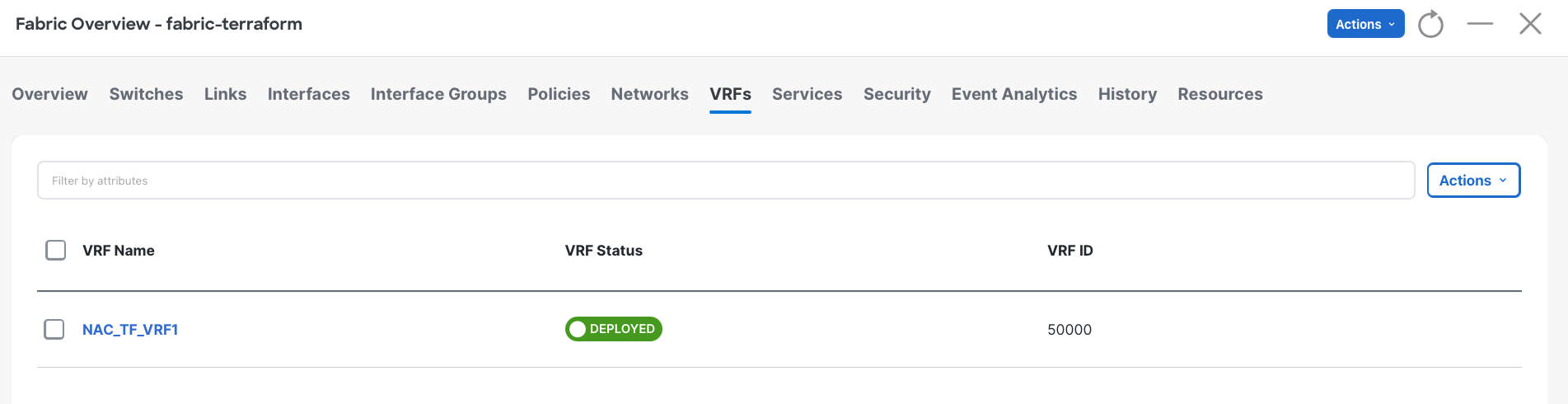
Return to your NDFC browser window and verify the deployment of the fabric configuration.
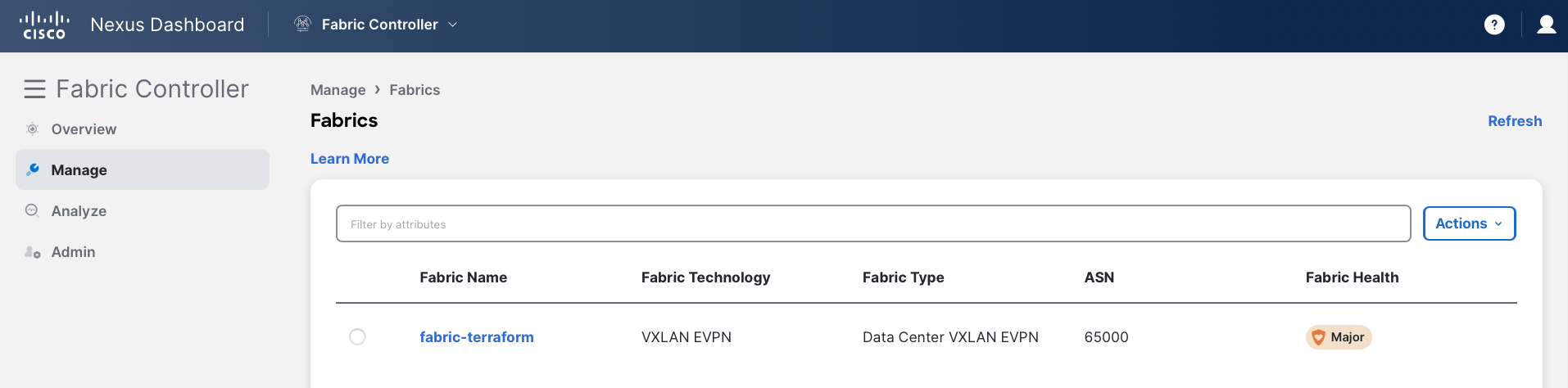
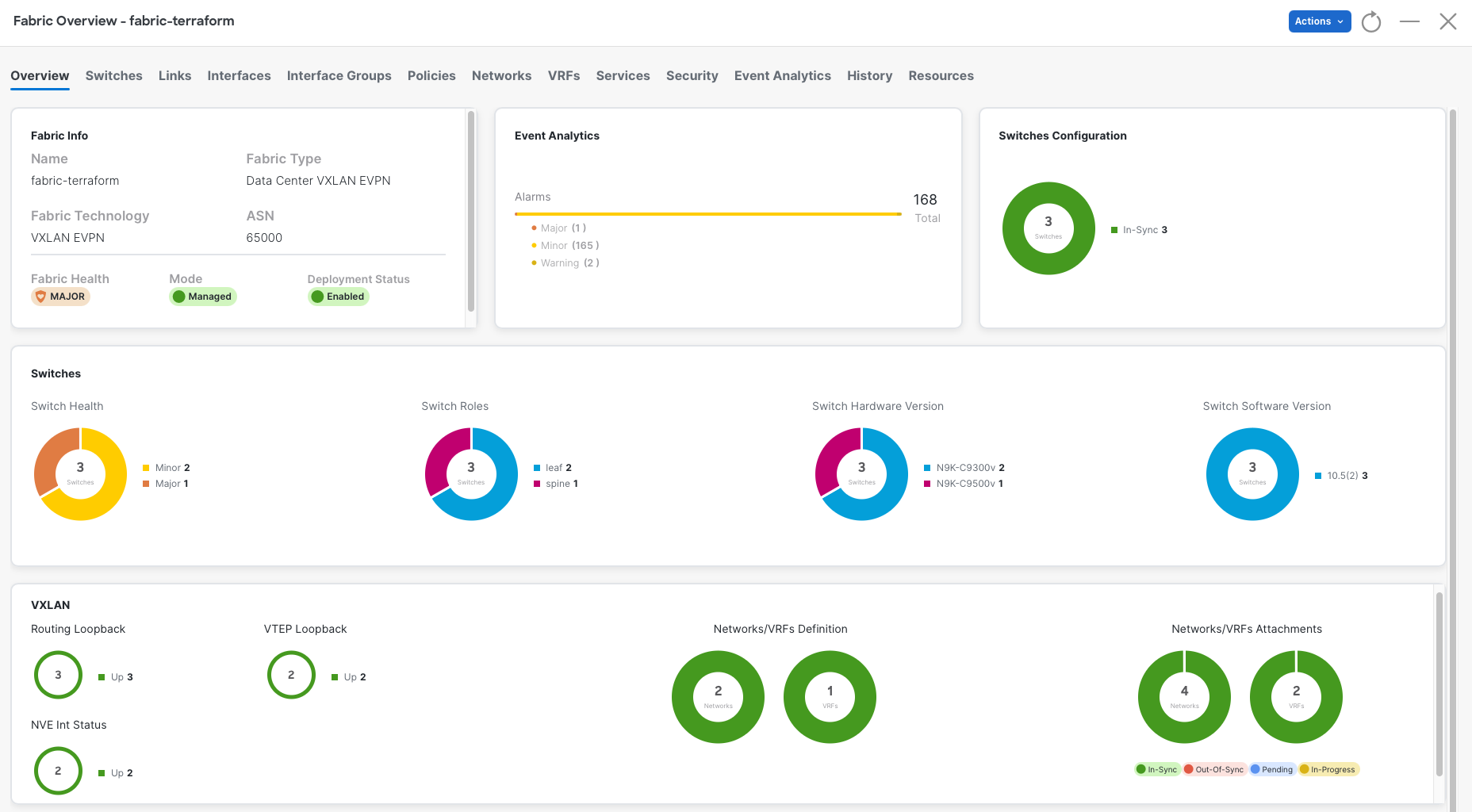
In-Sync. If not, click the Refresh button near the Actions button
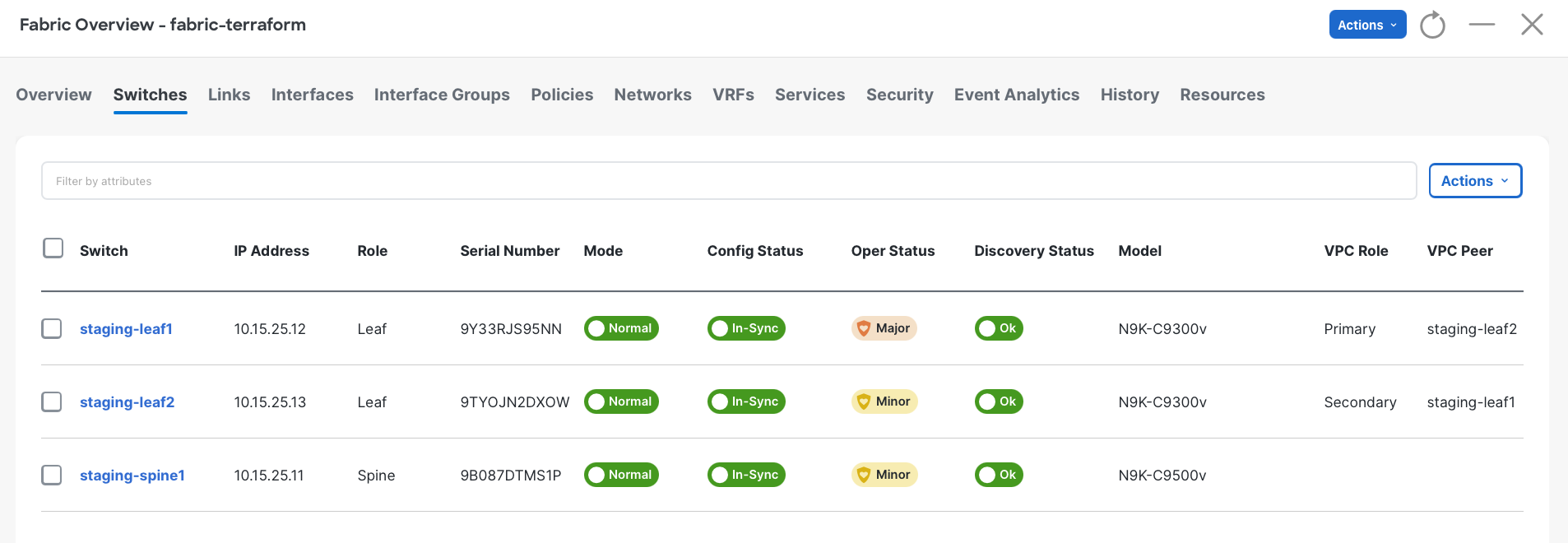
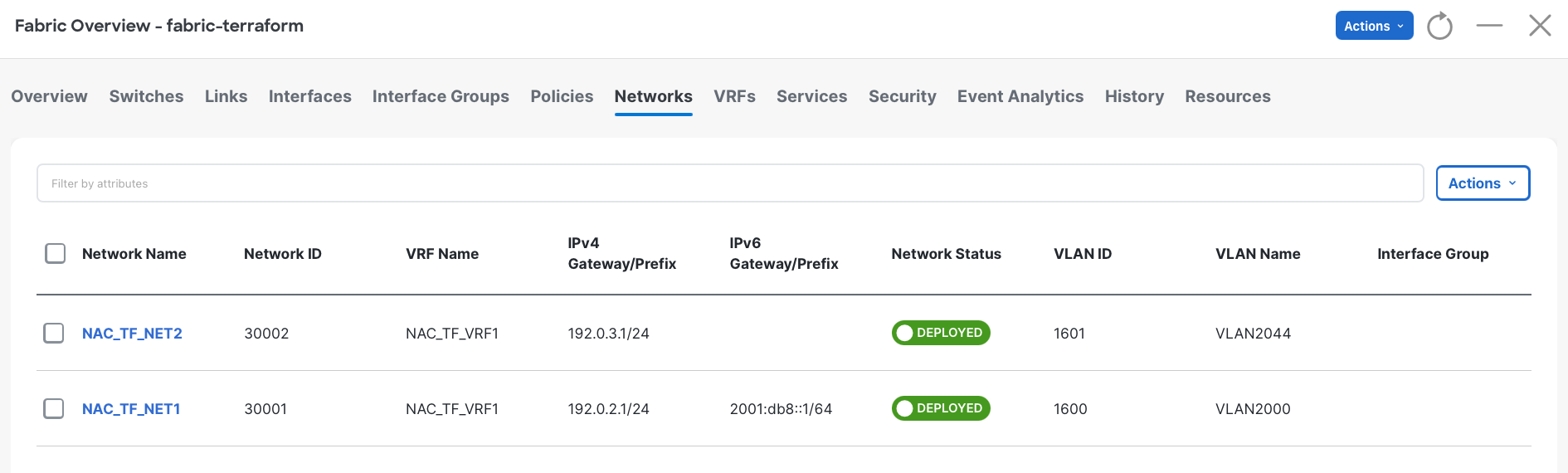
If you still want to learn more, continue to the Reference section to read about using Ansible to manage your NDFC fabric.