
AEtest (Automation Easy Testing) provides a simple, straightforward approach to defining, executing, and debugging test cases and test scripts. AEtest is available as a standard component (aetest) in pyATS in an effort to standardize the definition and execution of test cases and test scripts.
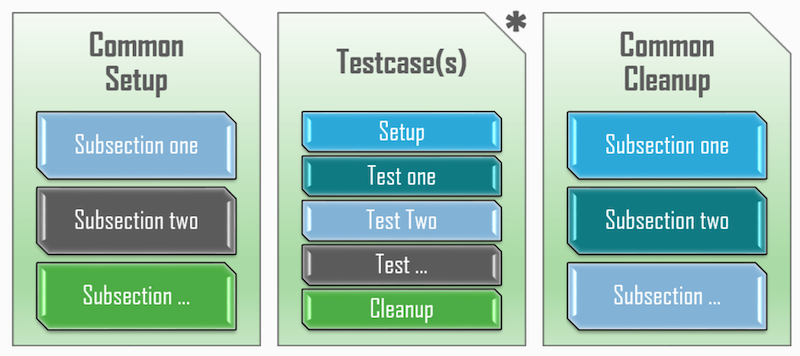
AEtest testscript structure is very modular and straightforward. Each testscript is split into three major container sections which are then further broken down into smaller method sections. These three containers are Common Setup, Testcase(s), and Common Cleanup. Throughout the steps in this section of the lab, you will examine each of these.
Create the main test script file that will orchestrate the execution of network validation tests using the pyATS AEtest framework.
touch ~/workspace/ndlab/nac/tests/pyats_aetest.py
code-server -r ~/workspace/ndlab/nac/tests/pyats_aetest.py
Import necessary pyATS modules, logging utilities, and custom test case classes that will be used throughout the test script to connect to devices and execute validation tests.
import warnings
warnings.filterwarnings('ignore', category=UserWarning)

from pyats import aetest
from pyats.topology import loader
from unicon.core.errors import ConnectionError
import logging
from nac_yaml.yaml import load_yaml_files
from aetest_bgw_rs_evpn_neighbor_test import VerifyBgwBgpL2vpnEvpnNeighbors
from aetest_nve_vnis_test import VerifyNveVnis


logger = logging.getLogger(__name__)
Implement the Common Setup container with subsections to load the YAML data model containing fabric configuration and establish REST API connections to the Nexus Dashboard fabric controller.
class CommonSetup(aetest.CommonSetup):
    @aetest.subsection
    def load_data_model_files(self, data_model_dir):
        """Load data model files"""
        data = {}
        data.setdefault('data', {})
        data['data'] = load_yaml_files([data_model_dir])

        self.parent.parameters.update({'fabric': data['data']['vxlan']['fabric']['name']})
        self.parent.parameters.update(data)

    @aetest.subsection
    def connect(self, testbed):
        """
        establishes connection to all your testbed devices.
        """
        # make sure testbed is provided
        assert testbed, "Testbed is not provided!"

        if len(testbed.devices) == 0:
            self.failed('{testbed} is empty'.format(testbed=str(testbed)))
        else:
            try:
                self.fabric = self.parent.parameters['fabric']
                logger.info(f"Connecting to {self.fabric}...")
                testbed.devices[self.fabric].connect(via='rest')
            except (TimeoutError, ConnectionError):
                logger.error(f"Unable to connect to {self.fabric}")
Verify successful connection to Nexus Dashboard and retrieve the complete fabric switch inventory via REST API, organizing device details (IP, role, ID) that will be used by subsequent test cases.
    @aetest.subsection
    def check_connection(self, testbed, steps):
        # Loop over every device in the testbed
        with steps.start(f"Test connection status for {testbed.devices[self.fabric]}", continue_=True) as step:
            if testbed.devices[self.fabric].connected:
                logger.info(f"{self.fabric} connected status: {testbed.devices[self.fabric].connected}")
            else:
                logger.error(f"{self.fabric} connected status: {testbed.devices[self.fabric].connected}")
                step.failed()

    @aetest.subsection
    def get_nd_inventory(self, testbed):
        # Parse into organized structure
        inventory = {}
        inventory.setdefault('inventory', {})
        inventory['inventory'].setdefault(self.fabric, {})

        api = f"/appcenter/cisco/ndfc/api/v1/lan-fabric/rest/control/fabrics/{self.fabric}/inventory/switchesByFabric"
        logger.info(f"Querying fabric {self.fabric} inventory endpoint...")

        try:
            switches = testbed.devices[self.fabric].rest.get(api)

            for switch in switches:
                fabric_name = switch['fabricName']
                logical_name = switch['logicalName']

                # Create fabric entry if it doesn't exist
                if fabric_name not in inventory['inventory'][self.fabric] :
                    inventory['inventory'][self.fabric][fabric_name] = {}

                # Add switch under its fabric
                inventory['inventory'][self.fabric][fabric_name][logical_name] = {
                    'ip': switch['ipAddress'],
                    'id': switch['switchDbID'],
                    'role': switch['switchRole'].replace(' ', '_')
                }

        except Exception as exc:  # pylint: disable=broad-except
            logger.error(f"Failed to get inventory for fabric {self.fabric}: {exc}")
            self.failed(f"Failed to get inventory for fabric {self.fabric}")

        self.parent.parameters.update(inventory)
Define test case classes that inherit from previously created test modules, enabling the execution of BGP EVPN neighbor verification and NVE VNI status validation tests within the AEtest framework.
class VerifyBgwBgpL2vpnEvpnNeighbors(VerifyBgwBgpL2vpnEvpnNeighbors):
    logger.info(f"Executing BGW BGP L2VPN EVPN neighbors verification test case...")


class VerifyNveVnis(VerifyNveVnis):
    logger.info(f"Executing VNIs status verification test case...")
Implement the Common Cleanup container to gracefully disconnect from the Nexus Dashboard fabric controller after all tests complete, ensuring proper resource cleanup.
class CommonCleanup(aetest.CommonCleanup):
    @aetest.subsection
    def disconnect(self, testbed):
        if testbed.devices[self.parent.parameters['fabric']].connected:
            logger.info(f"Disconnecting from {self.parent.parameters['fabric']}...")
            testbed.devices[self.parent.parameters['fabric']].disconnect()
Add the standard Python entry point that enables direct script execution using python pyats_aetest.py, triggering the AEtest framework to run all defined setup, test cases, and cleanup sections.
if __name__ == '__main__':
    aetest.main()
Continue to the next section to create your first test case.