
Once your fabric has been created, with the correct type and settings, you can start to add switches to the fabric.
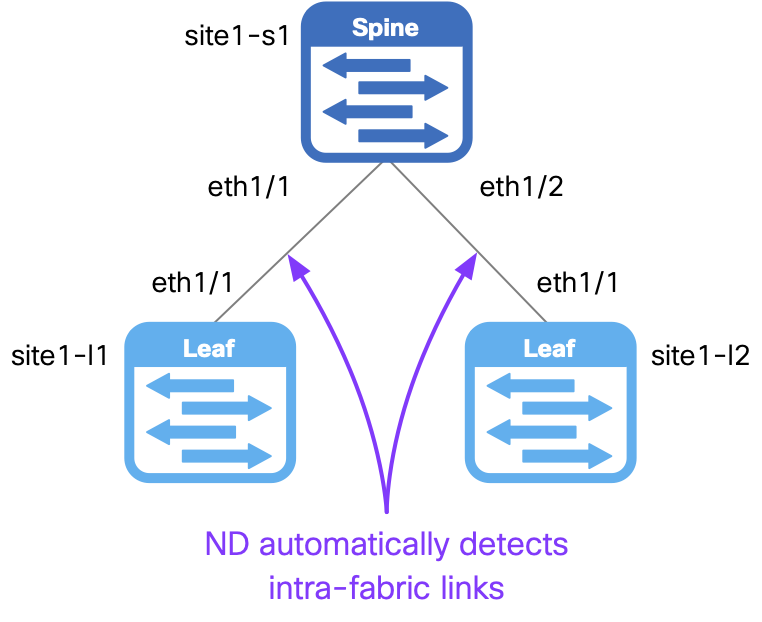
In this step, you will create a new file named topology.nac.yml to define the switches that will be added to the fabric including their roles and management IP addresses.
The roles assigned to the switches in this file will determine which configuration templates get applied to them later when you deploy the configuration to the switches in Nexus Dashboard.
Additionally, for the border leaf switch you will also define POAP pre-provisioning settings to ensure that when the switch boots up for the first time it will automatically get discovered by ND and provisioned with any pre-staged configuration.
touch ~/workspace/ndlab/nac/host_vars/site1-fabric/topology.nac.yml
code-server -r ~/workspace/ndlab/nac/host_vars/site1-fabric/topology.nac.yml
Copy and paste the following content into the topology.nac.yml file that is now open in your VSCode editor.
---

vxlan:
  topology:
    switches:
      - name: site1-s1
        serial_number: 9NR8DT6M101
        role: spine
        management:
          management_ipv4_address: 10.15.30.11
          default_gateway_v4: 10.15.30.1
      - name: site1-l1
        serial_number: 9AANPM7HFJ6
        role: leaf
        management:
          management_ipv4_address: 10.15.30.12
          default_gateway_v4: 10.15.30.1
      - name: site1-l2
        serial_number: 9W12HQN6WCO
        role: leaf
        management:
          management_ipv4_address: 10.15.30.13
          default_gateway_v4: 10.15.30.1
      - name: site1-bl1
        # Placeholder serial number - to be updated
        serial_number: FGE20360RRX
        role: border
        management:
          management_ipv4_address: 10.15.30.14
          subnet_mask_ipv4: 24
          default_gateway_v4: 10.15.30.1
        poap:
          preprovision:
            model: N9K-C9300v
            # Placeholder serial number
            serial_number: FGE20360RRX
            version: 10.6(2)
            modulesModel: [N9K-X9364v, N9K-vSUP]
      - name: site1-bgw1
        serial_number: 9W6ILGORQK7
        role: border_gateway
        management:
          management_ipv4_address: 10.15.30.15
          default_gateway_v4: 10.15.30.1
Make sure you are in your root Ansible directory.
cd ~/workspace/ndlab/nac
From the root Ansible project directory execute the following command:
ansible-playbook -i hosts.site1.yml vxlan.yml --tags cr_manage_switches
Again, the actual configuration deployment will not take place yet. The execution is performing the following:
Later in the lab you will deploy the configuration to the switches all at once which will take a little bit longer.
Go ahead and move to the next step while the Ansible playbook is running so you can see the switches getting added into ND.
In your ND browser, access site1-fabric and navigate to the switches view.
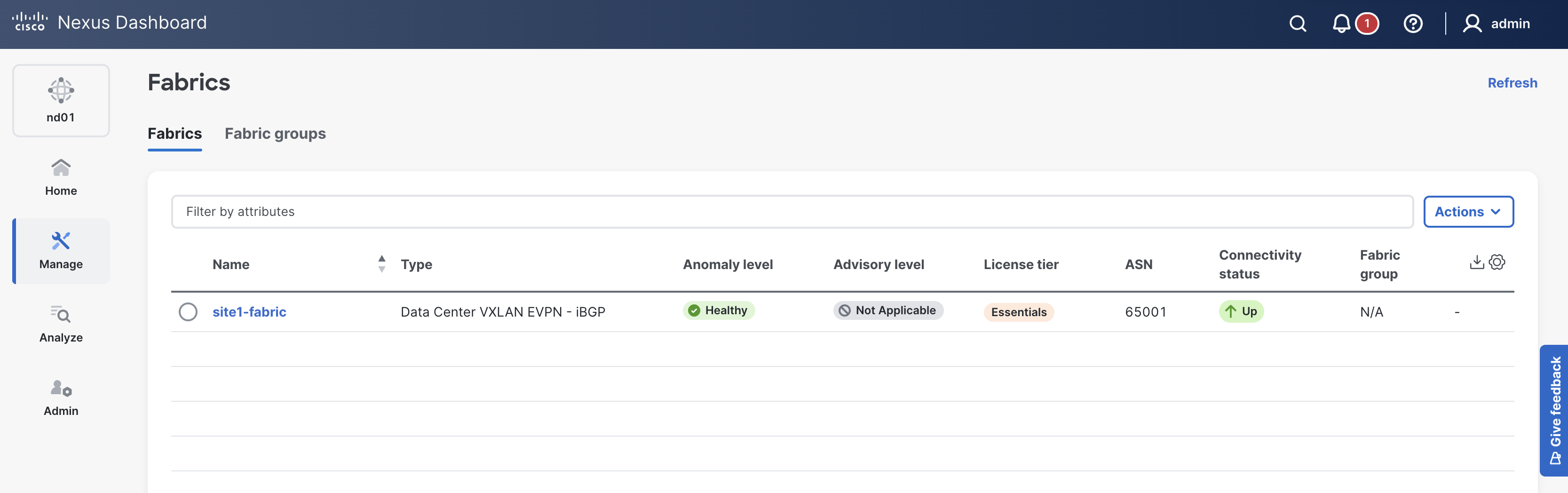
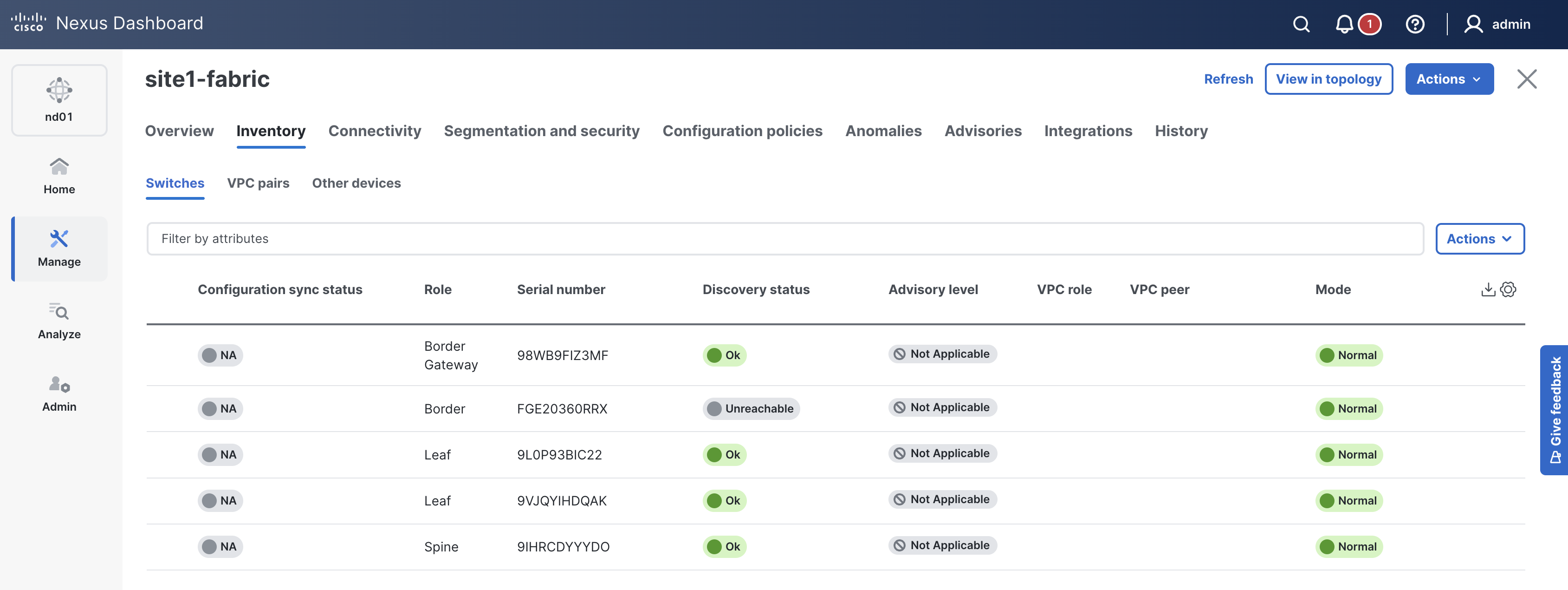
Here you will start to see the spine and leaf switches being discovered and added to the site1-fabric fabric.
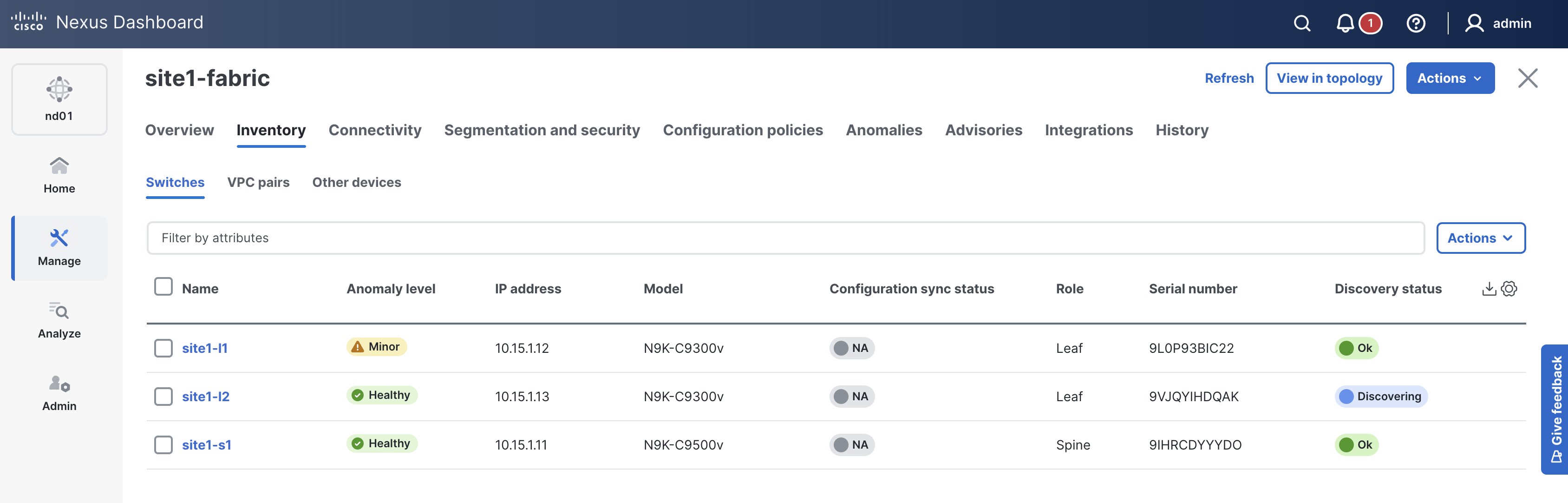
You will see the switches transition to different states during discovery (you may need to scroll to the right to see all the columns):
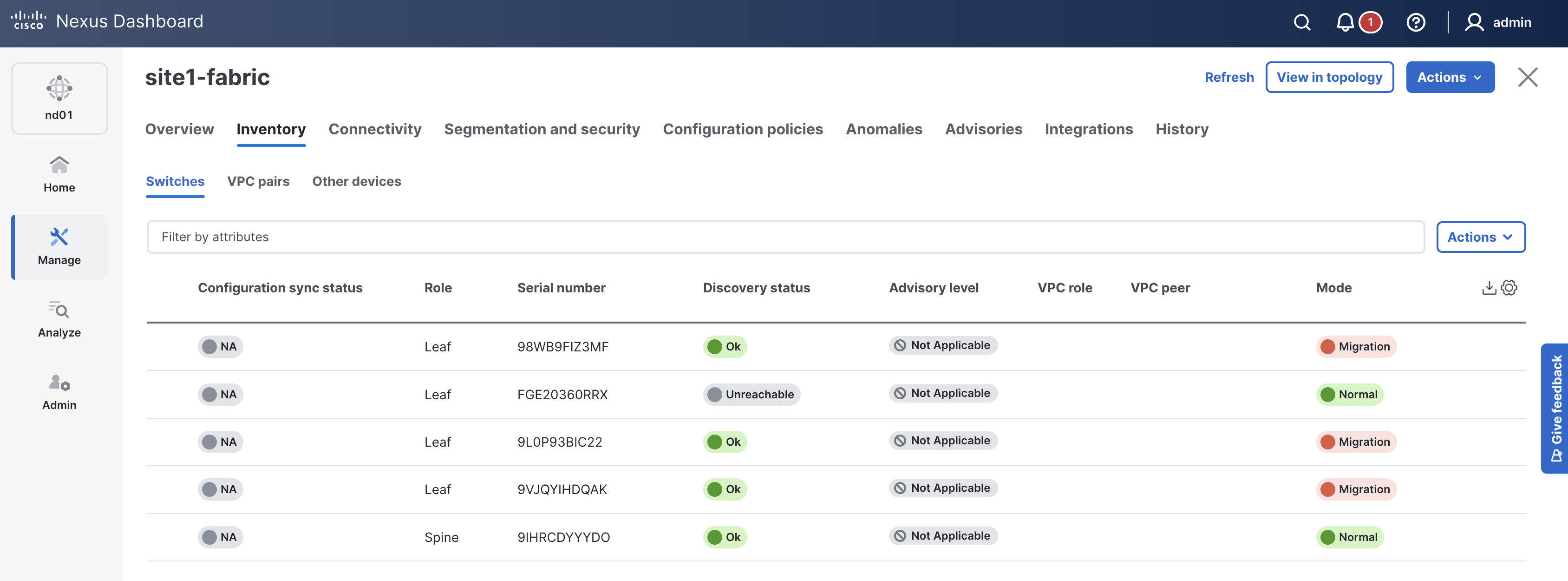
This might be a good time for a cup of coffee or tea while the switches get added to your Site1 fabric!


Upon a successful run of the playbook your output should look as follows:
  <... SNIP ...>

  PLAY RECAP **********************************************************************************************************************************************************************
  site1-fabric               : ok=39   changed=4    unreachable=0    failed=0    skipped=17   rescued=0    ignored=0


  PLAYBOOK RECAP *******************************************************************************************
  Playbook run took 0 days, 0 hours, 6 minutes, 5 seconds


  TASKS RECAP **********************************************************************************************
  Tuesday 02 June 2026  21:36:04 +0000 (0:00:00.099)       0:06:05.069 **********
  =============================================================================
  cisco.nac_dc_vxlan.create : Execute Create Resources -------------------------------------------- 350.43s
  cisco.nac_dc_vxlan.common : Build Resources ------------------------------------------------------- 3.35s
  cisco.nac_dc_vxlan.connectivity_check : Get Cisco Nexus Dashboard Fabric Controller Version ------- 1.64s
  cisco.nac_dc_vxlan.validate : Copy Service Model Data to Host ------------------------------------- 0.80s
  cisco.nac_dc_vxlan.connectivity_check : Verify Authorization to Nexus Dashboard ------------------- 0.79s
  cisco.nac_dc_vxlan.validate : Copy Extended Service Model Data to Host ---------------------------- 0.60s
  cisco.nac_dc_vxlan.validate : Stat Factory Defaults ----------------------------------------------- 0.52s
  cisco.nac_dc_vxlan.validate : Move Golden Service Model Data Previous ----------------------------- 0.50s
  cisco.nac_dc_vxlan.connectivity_check : Get Cisco Nexus Dashboard Version ------------------------- 0.49s
  cisco.nac_dc_vxlan.connectivity_check : Verify Connection to Nexus Dashboard ---------------------- 0.49s
  cisco.nac_dc_vxlan.validate : Stat the Golden Service Model Data ---------------------------------- 0.38s
  cisco.nac_dc_vxlan.validate : Move Extended Service Model Data Previous --------------------------- 0.35s
  cisco.nac_dc_vxlan.validate : Stat the Extended Service Model Data -------------------------------- 0.34s
  cisco.nac_dc_vxlan.create : Display Create Resources Summary -------------------------------------- 0.25s
  cisco.nac_dc_vxlan.common : Display Change Flag Values -------------------------------------------- 0.22s
  cisco.nac_dc_vxlan.common : Create Fact To Store Common Role Path --------------------------------- 0.21s
  cisco.nac_dc_vxlan.common : Display Resource Build Summary ---------------------------------------- 0.20s
  cisco.nac_dc_vxlan.connectivity_check : Set Cisco Nexus Dashboard Fabric Controller Version Var --- 0.20s
  cisco.nac_dc_vxlan.validate : Display Workflow Type - Direct to Controller (DTC) ------------------ 0.20s
  cisco.nac_dc_vxlan.validate : Display Role Path --------------------------------------------------- 0.19s

  ROLES RECAP **********************************************************************************************
  Tuesday 02 June 2026  21:36:04 +0000 (0:00:00.100)       0:06:05.069 **********
  ===============================================================================
  create ---------------------------------------------------------------- 350.78s
  validate ---------------------------------------------------------------- 6.06s
  common ------------------------------------------------------------------ 4.07s
  connectivity_check ------------------------------------------------------ 3.80s
  common_global ----------------------------------------------------------- 0.05s
  ~~~~~~~~~~~~~~~~~~~~~~~~~~~~~~~~~~~~~~~~~~~~~~~~~~~~~~~~~~~~~~~~~~~~~~~~~~~~~~~
  total ----------------------------------------------------------------- 364.75s
In this particular lab example, it took around 5-6 minutes to add the switches to the fabric, but next time you execute the role it will be much quicker because the switches are already added and are in the correct state.
It's also important to note here that it only took 5-6 minutes because the deploy role has not yet been executed. You will perform the configuration deployment from ND to the actual switches a little bit later in the lab, all at one time by calling the deploy role. Remember, you are staging everything in ND first, then pushing it to the switches all at once.
Check ND again and make sure the switches are added. The Mode should show as Normal and the Discovery Status should show as Ok, except for your pre-provisioned border leaf switch which will show as Unreachable.
You may have noticed that this time we ran the playbook with the --tags cr_manage_switches option to limit the tasks that were executed.
In this case, we limited execution to only the tasks that manage switches in the fabric.
To see a full list of supported tags in this collection, run the playbook command with --tags help
ansible-playbook -i hosts.site1.yml vxlan.yml -vvvv --tags help
You will see a list of supported tags in the output. The cr_manage_switches tag is used to manage switches in the fabric.
  <... SNIP ...>

  TASK [cisco.nac_dc_vxlan.common_global : Verify User Tags] ***********************************************
  task path: /home/pod30/workspace/ndlab/nac/collections/ansible_collections/cisco/nac_dc_vxlan/roles/common_global/tasks/main.yml:23
  Tuesday 02 June 2026  21:38:13 +0000 (0:00:00.306)       0:00:00.306 **********
  Tuesday 02 June 2026  21:38:13 +0000 (0:00:00.305)       0:00:00.305 **********
  fatal: [site1-fabric -> localhost]: FAILED! => {
      "changed": false,
      "msg": "Tag 'help' not found in list of supported tags",
      "supported_tags": [
          "cc_verify",
          "cr_manage_fabric",
          "cr_manage_switches",
          "cr_manage_vpc_peers",
          "cr_manage_interfaces",
          "cr_manage_vrfs",
          "cr_manage_networks",
          "cr_manage_policy",
          "cr_manage_links",
          "cr_manage_edge_connections",
          "cr_manage_tor_pairing",
          "rr_manage_interfaces",
          "rr_manage_networks",
          "rr_manage_vrfs",
          "rr_manage_vpc_peers",
          "rr_manage_links",
          "rr_manage_edge_connections",
          "rr_manage_switches",
          "rr_manage_policy",
          "rr_manage_tor_pairing",
          "role_validate",
          "role_create",
          "role_deploy",
          "role_remove"
      ]
  }

  PLAY RECAP **********************************************************************************************************************************************************************
  site1-fabric               : ok=0    changed=0    unreachable=0    failed=1    skipped=0    rescued=0    ignored=0

  <... SNIP ...>
KEY: cr_* prefix == create_role, rr_* prefix == remove_role
cr_manage_fabric - Create and manage the fabric
cr_manage_switches - Create and manage switches in the fabric
cr_manage_vpc_peers - Create and manage vPC peers
cr_manage_interfaces - Create and manage interfaces
cr_manage_vrfs_networks - Create and manage VRFs and networks
cr_manage_policy - Create and manage policies
cr_manage_links - Create and manage links
cr_manage_edge_connections - Create and manage edge connections
rr_manage_switches - Remove switches in the fabric
rr_manage_vpc_peers - Remove vPC peering
rr_manage_interfaces - Remove and/or put interfaces into a default state
rr_manage_vrfs - Remove VRFs
rr_manage_networks - Remove Networks
rr_manage_policy - Remove policies
rr_manage_links - Remove links
rr_manage_edge_connections - Remove edge connections
role_validate - Run the Validate role
role_create - Run the Create role
role_deploy - Run the Deploy role
role_remove - Run the Remove role
Navigate back to your VSCode application.
Continue to the next section to set up a vPC domain between leaf switches.